ads

Showing posts with label Html code. Show all posts

Monday, 15 February 2016

how to Enable Search Description For my Blog

 how to enable search description in blogger
In this tutorial i will teach you to enable search description in blogger blog. This will allow bloggers to add search description to individual blog post from within posting area. Meta tags are important part of SEO and this feature will allow you to drive more traffic to your blog. By adding search description people can see what a particular blog post is all about when they search on any search engine. In short search description or meta tags are summary of your blog post.


How to Enable Meta Tags

First you need to enable search description for your blog homepage to add search description to individual post. In order to do that follow simple steps given below.
1. Go to blogger Dashboard and click on Settings > Search Preferences.
2. Now under Meta Tag, edit description as show below.
 how to put description on my blog
3. Then choose Yes for enable search dersciption and enter a small description for your blog in less then 150 characters. For demonstration i have added description for my blog as you can see in below picture.
how to put description on my blog
4. Then save the changes. 
Now you will have meta tag description for your blog homepage and also search description option within your post area. You need to manually add description for you article or tutorial each time you publish new blog post.
 computer technology

Description Not Showing ?

If you are using custom or third party blogger template then description might not be showing for your blog. In order to fix this we need to edit blogger template.
1. Go to Blogger dashboard, Template > Edit Html
2. Search for <head> and paste the code given below just after it.
<b:if cond='data:blog.metaDescription != &quot;&quot;'>
  <meta expr:content='data:blog.metaDescription' name='description'/>
</b:if> 
3. Now save the template and done.

Importance Of Search Description

Search description will help web crawler to higher index your page based on summary  or description you added. So its good practice to always add 2 or 3 lines summary about your blog post. This will result in increase in traffic for your blog.
Read More »

How To Change Heading Style In Blogger Using CSS

 computer technology


How To Add CSS Style Sub Headings ?

1. Go to Blogger > Template  > Edit HTML
2. Now search for ]]></b:skin>
3. Paste the following code above ]]></b:skin>
/*mybloggersworld.com*/
.post h3{
color:#666;
border-top:1px dotted #666;
border-bottom:1px dotted #666;
font-size: 18px;
padding-top:2px;
padding-bottom:2px;
}
 .post h4:hover{
border-top:1px dotted #0080ff;
border-bottom:1px dotted #0080ff;
/*mybloggersworld.com*/
background-color: #289728;
color:#666;
padding-top:2px;
padding-bottom:2px;
}
4. Save the template and you are done.

How To Use This CSS Style Headings In Blog Post ?

1. Open a new blog post and type your sub heading
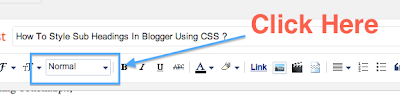
2. Now select Minor Heading from drop down by clicking on the icon as shown below.
 computer technology
3. Another way to do this is to surround the text between h3 tag as shown below.
<h3> Blogger Sub Heading </h3>
Read More »

Wednesday, 11 November 2015

5 Beautiful Recent Topic Widgets For Your Blog


Now let's jump straight to today's topic, I mean the new widgets that will make your own blog more beautiful and catch the emotion of your readers.
Have you ever think that beautiful website also hold visitors? Its kinda yes.
Because after setting up your seo, Google index your new site, you share contents to social networks like Facebook, twitter, digg and others. Beautiful website also hold customer and good articles.

Now what am about to share with you today is a simple, beautiful recent topics widget and as you already know sharing is caring. Adding a recent post widget for Blogger helps to reduce the dependency on email marketing, because you don't have to send out an email just to let people know you made a new post. Instead, it updates automatically for everyone to see.

Once you've managed to attract visitors to one of your posts using the recent post widget for Blogger, it will continue to act as an accessible secondary resource to navigate around your site. That way, you can avoid having them sifting through old content that might be outdated. 

And apart from beautiful it fill the extra space in your site. 
Now follow me....
Here are five cute recent post widget for your blog

Note: pick your prefer from the code.
Adding To Blogger


  1. Go to Design > Page Elements.
  2. Click Add A Gadget.
  3. In Add A Gadget window, select HTML/Javascript .
  4. Copy the code below and paste it inside the content box.
  5. Save the gadget.
  6. Drag the gadget and reposition it where you want it to appear.
  7. Click Save button (top right hand corner).

#style1
<script style="text/javascript" src="http://helplogger.googlecode.com/svn/trunk/helplogger/recentpoststhumbs.js"></script>
<script style="text/javascript">
var posts_no = 5;
var showpoststhumbs = true;
var readmorelink = true;
var showcommentslink = false;
var posts_date = true;
var post_summary = true;
var summary_chars = 70;
</script>
<script src="/feeds/posts/default?orderby=published&alt=json-in-script&callback=showlatestpostswiththumbs"></script>
<a style="font-size: 9px; color: #CECECE; float: right; margin: 5px;" href="http://helplogger.blogspot.com/2014/11/5-cool-recent-post-widgets-for-blogger.html" rel="nofollow">Recent Posts Widget</a>
<noscript>Your browser does not support JavaScript!</noscript>
<link href='http://fonts.googleapis.com/css?family=Ubuntu+Condensed' rel='stylesheet' type='text/css' />
<style type="text/css">
img.recent-post-thumb {width:50px;height:50px;float:right;margin: 5px -5px 0px 0px; border-radius: 100%; padding: 3px;background: #fff}
.recent-posts-container {font-family: 'Ubuntu Condensed', sans-serif; float: left;width: 100%;min-height: 55px;margin: 5px 0px 5px 0px;padding: 0;font-size:12px;}
ul.recent-posts-container {list-style-type: none; background: #fff;padding: 0px; }
ul.recent-posts-container li:nth-child(1n+0) {background: #F49A9A; width: 100%}
ul.recent-posts-container li:nth-child(2n+0) {background: #FCD092; width: 95%}
ul.recent-posts-container li:nth-child(3n+0) {background: #FFF59E; width: 90%;}
ul.recent-posts-container li:nth-child(4n+0) {background: #E1EFA0; width: 85%;}
ul.recent-posts-container li:nth-child(5n+0) {background: #B1DAEF; width: 80%;}
ul.recent-posts-container li {padding:5px 10px;min-height:50px; list-style-type: none; margin: 0px 5px -5px 5px; color: #777;}
.recent-posts-container a { text-decoration:none; }
.recent-posts-container a:hover { color: #222;}
.post-date {color:#e0c0c6; font-size: 11px; }
.recent-post-title a {font-size: 14px;color: #444; font-weight: bold;}
.recent-post-title {padding: 6px 0px;}
.recent-posts-details a{ color: #222;}
.recent-posts-details {padding: 5px 0px 5px; }
</style>

#style2

<div class="recentpoststyle">
<script src="http://helplogger.googlecode.com/svn/trunk/helplogger/recentposts.js"></script>
<script>
var posts_no = 5;var posts_date = true;var post_summary = true;var summary_chars = 80;</script>
<script src="/feeds/posts/default?orderby=published&amp;alt=json-in-script&amp;callback=showlatestposts">
</script><a style="font-size: 9px; color: #CECECE; float: right; margin: 5px;" href="http://helplogger.blogspot.com/2014/11/5-cool-recent-post-widgets-for-blogger.html" rel="nofollow">Recent Posts Widget</a>
<noscript>Your browser does not support JavaScript!</noscript>
<style type="text/css">
.recentpoststyle {counter-reset: countposts;list-style-type: none;}
.recentpoststyle a {text-decoration: none; color: #49A8D1;}
.recentpoststyle a:hover {color: #000;}
.recentpoststyle li:before {content: counter(countposts,decimal);counter-increment: countposts;float: left;z-index: 2;position:relative;font-size: 20px;font-weight: bold;color: #fff;background: #69B7E2; margin: 15px 5px 0px -6px; padding: 0px 10px; border-radius: 100%;}
li.recent-post-title { padding: 5px 0px;}
.recent-post-title { font-family: "Avant Garde",Avantgarde,"Century Gothic",CenturyGothic,AppleGothic,sans-serif;}
.recent-post-title a {color: #444;font-size: 13px; text-decoration: none; padding: 2px; font-weight: bold;}
.post-date {padding: 5px 2px 5px 30px; font-size: 11px; color: #999; margin-bottom: 5px;}
.recent-post-summ { border-left: 1px solid #69B7E2; color: #777; padding: 0px 5px 0px 20px; margin-left: 11px; font-family: Garamond,Baskerville,"Baskerville Old Face","Hoefler Text","Times New Roman",serif; font-size: 15px;}
</style></div>

#style3
<script style="text/javascript" src="http://helplogger.googlecode.com/svn/trunk/helplogger/recentpoststhumbs.js"></script>
<script style="text/javascript">
var posts_no = 5;
var showpoststhumbs = true;
var readmorelink = true;
var showcommentslink = true;
var posts_date = true;
var post_summary = true;
var summary_chars = 70;</script>
<script src="/feeds/posts/default?orderby=published&alt=json-in-script&callback=showlatestpostswiththumbs"></script>
<a style="font-size: 9px; color: #CECECE; float: right; margin: 5px;" href="http://helplogger.blogspot.com" rel="nofollow">Recent Posts Widget</a>
<noscript>Your browser does not support JavaScript!</noscript>
<link href='http://fonts.googleapis.com/css?family=Oswald' rel='stylesheet' type='text/css'/>
<style type="text/css">
img.recent-post-thumb {padding:2px;width:65px;height:65px;float:left;margin: 0px 10px 10px; background: #fff; border: 1px solid #69B7E2;}
.recent-posts-container {font-family: 'Oswald', sans-serif;  float: left;width: 100%;min-height: 70px;margin: 5px 0px 5px 0px;padding: 0;font-size:12px;}
ul.recent-posts-container li {position:relative;padding:5px 0px;min-height:65px; list-style-type: none; margin-bottom: 5px;}
ul.recent-posts-container {counter-reset: countposts;list-style-type: none;}
ul.recent-posts-container li:before {content: counter(countposts,decimal);counter-increment: countposts;z-index: 2;position:absolute; left: 15px; font-size: 13px;font-weight: bold;color: #fff;background: #69B7E2;padding: 4px 10px; border-radius: 100%;}
.recent-posts-container a { text-decoration:none; }
.recent-post-title a {font-size: 13px; text-transform: uppercase; color: #2aace3;}
.recent-posts-details {margin: 5px 0px 0px 92px; }
.recent-posts-details a{ color: #777;}
</style>

Style #4

<script style="text/javascript" src="http://helplogger.googlecode.com/svn/trunk/helplogger/recentposts2.js"></script>
<script style="text/javascript">
var posts_no = 5;
var showpoststhumbs = false;
var readmorelink = true;
var showcommentslink = true;
var posts_date = true;
</script>
<script src="/feeds/posts/default?orderby=published&alt=json-in-script&callback=showlatestpostswiththumbs"></script>
<a style="font-size: 9px; color: #CECECE; float: right; margin: 5px;" href="http://helplogger.blogspot.com">Recent Posts Widget</a>
<noscript>Your browser does not support JavaScript!</noscript>
<link href='http://fonts.googleapis.com/css?family=Oswald' rel='stylesheet' type='text/css'/>
<style type="text/css">
img.recent-post-thumb {padding: 2px; width:35px;height:35px;float:right;margin: -14px 0px 0px 5px; border: 1px solid #cea5ac; border-radius: 10%;}
.recent-posts-container {font-family: 'Oswald', sans-serif;  float: left;width: 100%;min-height: 70px;margin: 5px 0px 5px 0px;padding: 0;font-size:12px;}
ul.recent-posts-container li {position:relative;padding:5px 0px;min-height:65px; list-style-type: none; margin: 0px 10px 5px 35px;}
ul.recent-posts-container {counter-reset: countposts;list-style-type: none;}
ul.recent-posts-container li:before {content: counter(countposts,decimal);counter-increment: countposts;z-index: 2;position:absolute; left: 5px; font-size: 16px;color: #4D4D4D;background: #F7F7F7;padding: 9px 14px; border: 1px solid #efefef;}
.recent-posts-container a { text-decoration:none; }
.recent-posts-container a:hover{color: #4DACE3;}
.post-date {color:#e0c0c6; font-size: 11px; }
.recent-post-title a {font-size: 13px; text-transform: uppercase; color: #5C4D4D;}
.recent-post-title { margin: 5px 0px; }
.recent-posts-details {border-top: 4px solid #AC707A; margin-top: 5px; padding-top: 5px;}
.recent-posts-details a{ color: #888;}
a.readmorelink {color: #4DACE3;}
</style>

Style #5

recent posts, blogger gadget
<script style="text/javascript" src="https://helplogger.googlecode.com/svn/trunk/helplogger/recentposts2.js"></script>
<script style="text/javascript">
var posts_no = 5;
var showpoststhumbs = true;
var readmorelink = true;
var showcommentslink = true;
var posts_date = true;
</script>
<script src="/feeds/posts/default?orderby=published&alt=json-in-script&callback=showlatestpostswiththumbs" rel="nofollow"></script>
<a style="font-size: 9px; color: #CECECE; float: right; margin: 5px;" href="http://helplogger.blogspot.com/2014/11/5-cool-recent-post-widgets-for-blogger.html" rel="nofollow">Recent Posts Widget</a>
<noscript>Your browser does not support JavaScript!</noscript>
<link href='http://fonts.googleapis.com/css?family=Lobster|Gloria+Hallelujah' rel='stylesheet' type='text/css' />
<style type="text/css">
img.recent-post-thumb {width:50px;height:50px;float:right;margin: -4px -35px 0px 0px; border: 4px solid #FCD6CB; border-radius: 100%;}
.recent-posts-container {font-family: 'Gloria Hallelujah', cursive;  float: left;width: 100%;min-height: 55px;margin: 5px 0px 5px 0px;padding: 0;font-size:12px;}
ul.recent-posts-container {counter-reset: countposts;list-style-type: none; background: #fff; }
ul.recent-posts-container li:before {content: counter(countposts,decimal);counter-increment: countposts;z-index: 2;position:absolute; left: -20px; font-size: 16px;color: #616662;background: #FCD6CB;padding: 9px 14px; border-radius: 100%; margin-top: 15px;}
ul.recent-posts-container li {position:relative;padding:5px 0px;min-height:50px; list-style-type: none; margin: -2px 5px 5px 5px;  border-top: 2px solid #FCD6CB;}
ul.recent-posts-container {border: 2px solid #FCD6CB; }
.recent-posts-container a { text-decoration:none; }
.recent-posts-container a:hover { color: #222;}
.post-date {color:#e0c0c6; font-size: 11px; }
.recent-post-title a {font-size: 14px;color: #616662;}
.recent-post-title {padding: 6px 0px;}
.recent-posts-details a{ color: #888;}
.recent-posts-details {padding-bottom: 5px;}
a.readmorelink {color: #4DACE3;}
</style>
Read More »

Enter your email address:

Delivered by FeedBurner